
Monday, February 05, 2007

Saturday, February 03, 2007
Modifying keys with xmodmap
I have fat fingers, and my backspace ans insert keys are quite close to each other. And accidently pressing the insert key instead of backspace can be really annoying....All of a sudden you notice
your text is getting overwritten.
So, is there any way of getting rid of my insert key? Or better yet, can I replace Insert with Backspace? The answer: xmodmap
Here's what I did:
And incase you can't find which keycode is what, then you can run
To use this new configuration, I ran the command:
And so that I don't have to run it everytime, I put this command in my KDE autostart directory in a shellscript.
Pretty neat eh?
your text is getting overwritten.
So, is there any way of getting rid of my insert key? Or better yet, can I replace Insert with Backspace? The answer: xmodmap
Here's what I did:
xmodmap -pke > ~/.xmodmap.myown(This created my own xmodmap file)- Open it in a text editor. Find where Insert is. (Keycode 106 in my case)
- Find the line with Backspace, and replace the insert value with backspace. In the end, it will look something like this:
keycode 106 = BackSpace Terminate_Server
And incase you can't find which keycode is what, then you can run
xev in a terminal. Press a key, and its info will be displayed on the terminal.To use this new configuration, I ran the command:
xmodmap ~/.xmodmap.myownAnd so that I don't have to run it everytime, I put this command in my KDE autostart directory in a shellscript.
Pretty neat eh?
Monday, January 15, 2007
The DMA toggle
I had to burn a lot of anime for a friend who was visiting after a long time. The first few DVDs burned fine. Then my data transfer rate dropped from 8 to 10 MBps to a mere 2 MBps. I don't know why this happened.
My system started acting odd, there was a lot of CPU usage, and I could barely move my mouse. First thing I did was checked whether DMA was enabled. Yes, it was. Next, I did a google search, and found a forum post somewhere.
The post was about windows users encountering a similar problem, and all they did to solve it was to disable DMA, and then enable it again.
I remembered that there was a problem reading one of my old DVDs. So maybe there were a few CRC (cyclic redundancy check) errors, that caused my system to stop using DMA, just like windows.
Ergo, I decided to "toggle" DMA, turned it off, and turned it back on again. And tada!! All is back to normal. I'm burning as I type!
------------
Edit: 21 March 2007:
Today, the same thing happened, and I now have definite evidence of the fact that DMA was disabled by the kernel:
Sure enough, CD burning was slow and crappy, and the mouse went nuts:
My system started acting odd, there was a lot of CPU usage, and I could barely move my mouse. First thing I did was checked whether DMA was enabled. Yes, it was. Next, I did a google search, and found a forum post somewhere.
The post was about windows users encountering a similar problem, and all they did to solve it was to disable DMA, and then enable it again.
I remembered that there was a problem reading one of my old DVDs. So maybe there were a few CRC (cyclic redundancy check) errors, that caused my system to stop using DMA, just like windows.
Ergo, I decided to "toggle" DMA, turned it off, and turned it back on again. And tada!! All is back to normal. I'm burning as I type!
------------
Edit: 21 March 2007:
Today, the same thing happened, and I now have definite evidence of the fact that DMA was disabled by the kernel:
Mar 21 15:54:36 ranjan404 kernel: [17197775.652000] hdd: DMA disabledSure enough, CD burning was slow and crappy, and the mouse went nuts:
Mar 21 16:13:34 ranjan404 kernel: [17198913.988000] psmouse.c: Wheel Mouse at isa0060/serio1/input0 lost synchronization, throwing 3 bytes away.
Saturday, December 16, 2006
The distro of the beast
I came across an interesting version of Ubuntu: Satanic Edition. Check it out...
Wednesday, November 08, 2006
It was a nightmare allright...
But I did manage to get it running. I had run this command to get all the debs in my cache before upgrading the system, as my internet connection is quite slow. (But its free at night)
I checked on the Ubuntu wiki page, and it mentioned that using apt-get is not recommended. So I used the graphical interface, as mentioned. Unfortunately, I got some error, that I didn't bother noting, and the installer quit. The graphical interface gave the same error again, and the only way to fix it would be apt-get -f install
So I chucked the graphical interface, and went back to the CLI. After a whole day of forcing (apt-get -f install) and dpkg-ing (some things went so bad, they had to be done manually), I finally managed to get the system up.
Today, I see that Upstart hasn't been installed, inspite of doing apt-get dist-upgrade twice. I had forgotten to install Ubuntu-minimal...geez...
So now I'm going to reboot my system, and hope that it boots properly, and faster!! :) Wish me luck...
apt-get --download-only dist-upgrade I checked on the Ubuntu wiki page, and it mentioned that using apt-get is not recommended. So I used the graphical interface, as mentioned. Unfortunately, I got some error, that I didn't bother noting, and the installer quit. The graphical interface gave the same error again, and the only way to fix it would be apt-get -f install
So I chucked the graphical interface, and went back to the CLI. After a whole day of forcing (apt-get -f install) and dpkg-ing (some things went so bad, they had to be done manually), I finally managed to get the system up.
Today, I see that Upstart hasn't been installed, inspite of doing apt-get dist-upgrade twice. I had forgotten to install Ubuntu-minimal...geez...
So now I'm going to reboot my system, and hope that it boots properly, and faster!! :) Wish me luck...
Monday, October 30, 2006
Upgrading to Ubuntu Edgy Eft a "Nightmare" ?
There's an article on Slashdot saying that several people are having trouble upgrading to Edgy (the latest Ubuntu release). I'm currently in the process of upgrading. Lets hope everything works out well...
I have followed this guide to do the upgrade. (The wiki keeps updating) Only difference is that I'm using the command: sudo apt-get --download-only dist-upgrade . Since I have a slow internet connection, I figured it would be better to download all the packages at night, little by little, and then run the upgrade process.
I don't have important data on my root partition, and my /home partition is separate.
Just to be on the safer side, I'll backup all important data before doing the upgrade.
I have followed this guide to do the upgrade. (The wiki keeps updating) Only difference is that I'm using the command: sudo apt-get --download-only dist-upgrade . Since I have a slow internet connection, I figured it would be better to download all the packages at night, little by little, and then run the upgrade process.
I don't have important data on my root partition, and my /home partition is separate.
Just to be on the safer side, I'll backup all important data before doing the upgrade.
Monday, October 09, 2006
Out of space...
The other day, I was just browsing around, and I started downloading something. All of a sudden, firefox crashed!! I'm like...wtf...
Anyway, I just started the browser again, and recovered my browsing session, thanks to this nice extension.
Then, I tried to copy a shortcut from the K Menu to the desktop. I got an error message saying "Insufficient disk space". Wtf, a teeny-weeny shorcut...how much free space do I have anyway?
So I started Kwikdisk, and I saw that I just have 36KB free on the /home partition!!!

At this point, I would have expected any operating system to crash. But this is linux, things work differently here. ;)
The reason why firefox crashed was because it probably couldn't cache anything in ~/.mozilla. Technically, this would be a firefox bug, and not a linux bug. (Or so I think).
Finally, I just copied stuff onto my other partitions that had some free space. Now i have a lot of DVDs to burn.
Anyway, I just started the browser again, and recovered my browsing session, thanks to this nice extension.
Then, I tried to copy a shortcut from the K Menu to the desktop. I got an error message saying "Insufficient disk space". Wtf, a teeny-weeny shorcut...how much free space do I have anyway?
So I started Kwikdisk, and I saw that I just have 36KB free on the /home partition!!!
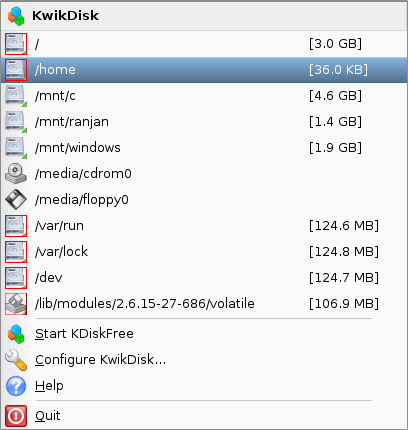
At this point, I would have expected any operating system to crash. But this is linux, things work differently here. ;)
The reason why firefox crashed was because it probably couldn't cache anything in ~/.mozilla. Technically, this would be a firefox bug, and not a linux bug. (Or so I think).
Finally, I just copied stuff onto my other partitions that had some free space. Now i have a lot of DVDs to burn.
Friday, October 06, 2006
MP3FS and Upstart
No need to rip your CDs to MP3s. You can just use MP3FS: http://www.linux.com/article.pl?sid=06/09/29/1525201
Also, Ubuntu will be replacing init with Upstart. Check out this article for in-depth information: http://www.linux.com/article.pl?sid=06/09/18/1623244
Also, Ubuntu will be replacing init with Upstart. Check out this article for in-depth information: http://www.linux.com/article.pl?sid=06/09/18/1623244
Wednesday, September 13, 2006
Tuesday, September 05, 2006
Myths, Lies, and Truths about the Linux kernel
The article linked below is a must read for every linux user, new or experienced:
linux kernel monkey log
linux kernel monkey log
Saturday, September 02, 2006
How to convert YouTube videos to DivX or XviD
Linux.com | How to convert YouTube videos to DivX or XviD: "How to convert YouTube videos to DivX or XviD
Wednesday August 30, 2006 (08:01 AM GMT)
By: Manolis Tzanidakis
YouTube clips are everywhere these days, and I must admit I'm addicted to the site. Nevertheless, I've had a couple of small annoyances with YouTube videos. I wanted to be able to play my favorite ones on standalone DVD/DivX players. I also found I couldn't go backwards or forwards when playing the site's Flash videos with MPlayer. For those reasons, I decided to convert my favorite YouTube videos to DivX or XviD formats. Here's how you can do the same.
"
Wednesday August 30, 2006 (08:01 AM GMT)
By: Manolis Tzanidakis
YouTube clips are everywhere these days, and I must admit I'm addicted to the site. Nevertheless, I've had a couple of small annoyances with YouTube videos. I wanted to be able to play my favorite ones on standalone DVD/DivX players. I also found I couldn't go backwards or forwards when playing the site's Flash videos with MPlayer. For those reasons, I decided to convert my favorite YouTube videos to DivX or XviD formats. Here's how you can do the same.
"
Linux Flash Player
FINALLY!! Our prayers have been answered. :D
» Interview with Mike Melanson, lead engineer on the Linux Flash Player team | The Universal Desktop | ZDNet.com
» Interview with Mike Melanson, lead engineer on the Linux Flash Player team | The Universal Desktop | ZDNet.com
Tuesday, August 29, 2006
Linux.com | How to recover lost files after you accidentally wipe your hard drive
Linux.com | How to recover lost files after you accidentally wipe your hard drive: "How to recover lost files after you accidentally wipe your hard drive
Monday August 28, 2006 (08:01 AM GMT)
By: Shawn Hermans
Recently I wanted to make sure I had enough space to back up my home digital videos and pictures, so I purchased a new hard drive to add to my home Linux server. I moved all the files I wanted to save onto a single hard drive and repartitioned the old hard drive so I could upgrade to a newer version of Linux. After going through the process of reinstalling the operating system, I mounted the backup hard drive and discovered that it was empty. I had some how mixed up the hard drive I used to back up all the data with a hard drive that I wanted to wipe. Because I had done such a poor job of retaining backups on external media, I did not have any backups of my pictures and videos.
After the overwhelming feeling of dread passed, I started to look into file recovery options. I demoed a variety of commercial products to see if any of them could find my lost files or partitions. Nothing seemed to work. Finally, I discovered TestDisk and PhotoRec, and was able to use the latter to recover my lost files.
TestDisk can recover lost partitions of virtually any filesystem. PhotoRec can recover files of most types, including most picture and video formats. PhotoRec can be used on existing partitions, or can be used to recover files on deleted partitions without having to recover the underlying partitions. Both PhotoRec and TestDisk can be run on DOS, Windows (9x, NT, 2000, XP, 2003), Linux, FreeBSD, NetBSD, OpenBSD, Sun Solaris, and Mac OS X, and, their developers claim, can be compiled and run on most Unix systems."
Monday August 28, 2006 (08:01 AM GMT)
By: Shawn Hermans
Recently I wanted to make sure I had enough space to back up my home digital videos and pictures, so I purchased a new hard drive to add to my home Linux server. I moved all the files I wanted to save onto a single hard drive and repartitioned the old hard drive so I could upgrade to a newer version of Linux. After going through the process of reinstalling the operating system, I mounted the backup hard drive and discovered that it was empty. I had some how mixed up the hard drive I used to back up all the data with a hard drive that I wanted to wipe. Because I had done such a poor job of retaining backups on external media, I did not have any backups of my pictures and videos.
After the overwhelming feeling of dread passed, I started to look into file recovery options. I demoed a variety of commercial products to see if any of them could find my lost files or partitions. Nothing seemed to work. Finally, I discovered TestDisk and PhotoRec, and was able to use the latter to recover my lost files.
TestDisk can recover lost partitions of virtually any filesystem. PhotoRec can recover files of most types, including most picture and video formats. PhotoRec can be used on existing partitions, or can be used to recover files on deleted partitions without having to recover the underlying partitions. Both PhotoRec and TestDisk can be run on DOS, Windows (9x, NT, 2000, XP, 2003), Linux, FreeBSD, NetBSD, OpenBSD, Sun Solaris, and Mac OS X, and, their developers claim, can be compiled and run on most Unix systems."
Monday, August 14, 2006
Monday, July 17, 2006
Sunday, June 25, 2006
Japanese Input in linux
I was trying to setup Japanese input in linux. This was not an easy task, however I found it easier than windows. Here's what I did (on ubuntu):
1) sudo apt-get install im anthy scim-gtk2-immodule scim-uim scim-qtimm
2) Create a file called 75custom-write_japanese in /etc/X11/Xsession.d/
Paste the following lines in it:
export XMODIFIERS="@im=SCIM"
export GTK_IM_MODULE="scim"
export XIM_PROGRAM="scim -d"
export QT_IM_MODULE="scim"
3) sudo dpkg-reconfigure locales
(Over here, if you have the option of selecting anything, select en_US.UTF-8. But I was not given the option of selecting)
4) Add scim -d to your startup. For KDE, make a file ~/.kde/Autostart/startscim
Paste the following lines:
#!/bin/sh
scim -d
5) Run: chmod 744 ~/.kde/Autostart/startscim
6) Restart the X server.
Now you will see a nice little gtk-applet sitting in the systray. You can click on it, configure it, and use it to select Japanese or English. It takes a while to get used to it. It will also popup an annoying panel of its own when you select Japanese input. You can drag this to a place more convenient.
All in all, it works well, and I'm happy with it.
Information taken from this page
1) sudo apt-get install im anthy scim-gtk2-immodule scim-uim scim-qtimm
2) Create a file called 75custom-write_japanese in /etc/X11/Xsession.d/
Paste the following lines in it:
export XMODIFIERS="@im=SCIM"
export GTK_IM_MODULE="scim"
export XIM_PROGRAM="scim -d"
export QT_IM_MODULE="scim"
3) sudo dpkg-reconfigure locales
(Over here, if you have the option of selecting anything, select en_US.UTF-8. But I was not given the option of selecting)
4) Add scim -d to your startup. For KDE, make a file ~/.kde/Autostart/startscim
Paste the following lines:
#!/bin/sh
scim -d
5) Run: chmod 744 ~/.kde/Autostart/startscim
6) Restart the X server.
Now you will see a nice little gtk-applet sitting in the systray. You can click on it, configure it, and use it to select Japanese or English. It takes a while to get used to it. It will also popup an annoying panel of its own when you select Japanese input. You can drag this to a place more convenient.
All in all, it works well, and I'm happy with it.
Information taken from this page
Saturday, June 24, 2006
Dealing with "The Most Annoying Web Page"
Many of you may have come across "the most annoying web page". It's a sick page that keeps giving you popups. Now if you don't want to keep clicking on those retarded popups (javascript alerts). Then here's what you do: (apart from killing your browser).
1) Open a new browser window
2) Disable Javascript (In firefox you go to Edit>Preferences>Content)
3) Click on the popup one last time, and it's all over.
4) Enable Javascript again.
Click here if you want to check it out. (Its way too annoying)
1) Open a new browser window
2) Disable Javascript (In firefox you go to Edit>Preferences>Content)
3) Click on the popup one last time, and it's all over.
4) Enable Javascript again.
Click here if you want to check it out. (Its way too annoying)
Friday, June 23, 2006
Firestarter and BORGChat
I use a LAN chat client called BORGChat. Its a very good piece of work. Although its a windows program, I run it in linux with WINE.
Getting BorgChat to work through firestarter was a bit of a problem, but I managed to figure it out. First, I found out which ports borgchat uses. This can be done in two ways:
1) Open BorgChat, go to "Options > Connections" and it will show you the post
2) Disable the firewall, run BorgChat. now open a terminal, and type sudo lsof -Pni . Now look for Borgchat and Wine. You will find the ports on which they are listening.
Once you know the ports, you have to open these ports in Firestarter. I allowed only Local users to access, by using 10.10.19.152/255.255.255.128 (ip-address/subnet-mask) in the "allowed" section.
But borg was still not working. Then, I went to "Options > Connections" in BorgChat again, and selected the method IP multicast instead of UDP broadcast. And then I told my friend on LAN to do the same. Borgchat then started running normally. I can even transfer files.
The obvious drawback of this method is that you'll have to tell all people on the LAN to use IP Multicast. I have only one friend on LAN, whom I chat with, so it was not a problem for me.
If, by chance, Borg is still not working for you, then you may need to follow the steps in my previous post (Firestarter and Samba).
LiNuX RuLZ!!
Getting BorgChat to work through firestarter was a bit of a problem, but I managed to figure it out. First, I found out which ports borgchat uses. This can be done in two ways:
1) Open BorgChat, go to "Options > Connections" and it will show you the post
2) Disable the firewall, run BorgChat. now open a terminal, and type sudo lsof -Pni . Now look for Borgchat and Wine. You will find the ports on which they are listening.
Once you know the ports, you have to open these ports in Firestarter. I allowed only Local users to access, by using 10.10.19.152/255.255.255.128 (ip-address/subnet-mask) in the "allowed" section.
But borg was still not working. Then, I went to "Options > Connections" in BorgChat again, and selected the method IP multicast instead of UDP broadcast. And then I told my friend on LAN to do the same. Borgchat then started running normally. I can even transfer files.
The obvious drawback of this method is that you'll have to tell all people on the LAN to use IP Multicast. I have only one friend on LAN, whom I chat with, so it was not a problem for me.
If, by chance, Borg is still not working for you, then you may need to follow the steps in my previous post (Firestarter and Samba).
LiNuX RuLZ!!
Thursday, June 22, 2006
Firestarter and Samba
In my previous post, I have described how I set up Firestarter. However, there were a few issues with Samba. I was able to browse my shares by entering the IP address. But, today when I tried to "browse" my network, I couldn't see anyone. Konqueror gave me an error saying. "Unable to browse local network. This may be caused by a firewall" (something like that).
Then I stumbled across this thread on ubuntuforums. It gave a very good picture of what was going on, and also a solution to the problem. Now, as you know, I'm a total n00b when it comes to networking, and I didn't actually understand everything, but I managed to set things right.
First of all, in the "Policy" tab of firestarter, I had opened Samba ports (137-139 445) and I had set "10.10.19." as my allowed source for samba. I figured that the correct format should be IP-address/subnet-mask. So I set it as 10.10.19.152/255.255.255.128 . Again, I'm not entirely sure of this. See this page for more details.
Next, I installed "winbind." I don't know what exactly winbind is, but it seems that it plays a role in resolving hostnames. Do a web search for more details.
After that, I edited the file /etc/firestarter/inbound/setup .There I added the line:
# Allow response to netbios name broadcasts from the local network.
$IPT -A INBOUND -s $NET -p udp -m state --state NEW -j ACCEPT
Then just restarted firestarter (sudo /etc/init.d/firestarter restart), and I was able to browse my local network in konqueror.
Since I installed winbind, I also added "wins" to the "hosts" line in /etc/nsswitch.conf:
hosts: files dns mdns wins
This will allow ordinary TCP/IP programs to resolve hostnames with netbios. (Don't know what it means :-P )
Then I stumbled across this thread on ubuntuforums. It gave a very good picture of what was going on, and also a solution to the problem. Now, as you know, I'm a total n00b when it comes to networking, and I didn't actually understand everything, but I managed to set things right.
First of all, in the "Policy" tab of firestarter, I had opened Samba ports (137-139 445) and I had set "10.10.19." as my allowed source for samba. I figured that the correct format should be IP-address/subnet-mask. So I set it as 10.10.19.152/255.255.255.128 . Again, I'm not entirely sure of this. See this page for more details.
Next, I installed "winbind." I don't know what exactly winbind is, but it seems that it plays a role in resolving hostnames. Do a web search for more details.
After that, I edited the file /etc/firestarter/inbound/setup .There I added the line:
# Allow response to netbios name broadcasts from the local network.
$IPT -A INBOUND -s $NET -p udp -m state --state NEW -j ACCEPT
Then just restarted firestarter (sudo /etc/init.d/firestarter restart), and I was able to browse my local network in konqueror.
Since I installed winbind, I also added "wins" to the "hosts" line in /etc/nsswitch.conf:
hosts: files dns mdns wins
This will allow ordinary TCP/IP programs to resolve hostnames with netbios. (Don't know what it means :-P )
Subscribe to:
Posts (Atom)