Saturday, March 25, 2006

subtitle trouble

My friend gave me a copy of Final Fantasy - Advent Children. It has an srt file with english subtitles. But for some reason, mplayer wouldn't recognise the subtitles.

Then I realised that the subtitle file and avi file must have the same name. So a simple renaming solved the problem, and I could play the subtitles

Saturday, March 18, 2006

Copying VCD tracks using cdfs

I tried to copy a vcd just by copying the avseq01.dat and other .dat files, but I was getting an I/O error. So I found out that I have to install a program called CDFS. You can download it from here.

Next, I unzipped the folder, used "make" and "make install". I had to do an additional step: sudo insmod cdfs.ko This is to activate the filesystem. See the INSTALL file for more details.

Now I mounted the VCD, not using iso9660, but cdfs, like this: sudo mount -t cdfs /dev/dvd /media/cdrom

Now when I browse the /media/cdrom folder, I can see the vcd tracks as mpeg files. All I have to do is copy them. Its taking a long time, but its working...

Apparently, CDFS has a lot of other uses, like copying data from corrupt multisession disks. Get more info from this site.

Update: 05 August 2006: Easier solution:

Just get vcdimager and use vcdxrip :)

Tuesday, March 14, 2006

Enable DMA

Is your CD/DVD Burning too slow? Does it make your system hang? Maybe you need to enable DMA !!

I bought a DVD writer, an LG model, and I noticed that burning was slower than usual and it was making my system hang.

To check whether DMA was enabled, I did:

sudo cat /proc/ide/hdd/


The last line was something like this:

using_dma 0 0 1 rw


Notice that the value in the first column is zero, which means that DMA is not enabled.

Then I ran the command:

sudo hdparm -d1 /dev/hdd


And Tada !! CD burning doubled in speed, and no more hanging. cool, eh ?

Edit: Everytime you reboot, DMA will be disabled, so you have to take appropriate steps to make sure that DMA is enabled on boot. Ubuntu users can follow this guide.

Thursday, March 02, 2006

Resizing lots of images at once

My sister got engaged recently, and I had a lot of high resolution pics, which I wanted to upload. I needed to resize these images, in order to make them small and upload them.

I found out about a command called "mogrify". All I had to do was:
1) Create a separate folder, and backup the high-res pics, as they will be overwritten.
2) Run the command mogrify -geometry 640x425 ./*.* in the directory that I had to resize the images.
3) Wait...

In a couple of minutes, all the images will be resized !!

Mogrify can do a lot more than just resize images. Run mogrify -help for details. :)

Wednesday, March 01, 2006

Why windows Vista won't suck.

I came across this article from slashdot. Why Windows Vista won't suck

Well, I'll be able to tell that only after I use it. Moreover, my computer isn't fast enough to support Vista. I've only downloaded a transition pack that changed the graphics to Vista style :-P

Whatever the case, there seem to be some major improvements in Vista. Lets wait and see

Saturday, February 25, 2006

wma to mp3

I found an old script on linuxquestions.org to convert wma's to mp3's.
I had to make a minor change to get it working with the latest version
of mplayer.


Requirements: Lame, mplayer.


To save the script, do this:

sudo
gedit /usr/bin/wma2mp3


then copy paste the code.

Then type:

sudo
chmod a+x /usr/bin/wma2mp3


If you don't have sudo, then just remove sudo and run the commands as
root.


Here is the code:


#!/bin/bash

current_directory=$( pwd )
#remove spaces
for i in *.wma; do mv "$i" `echo $i | tr ' ' '_'`; done
#remove uppercase
for i in *.[Ww][Mm][Aa]; do mv "$i" `echo $i | tr '[A-Z]' '[a-z]'`; done
#Rip with Mplayer / encode with LAME
for i in *.wma ; do mplayer -vo null -vc dummy -af resample=44100 -ao
pcm:waveheader $i && lame -m s audiodump.wav -o $i; done
#convert file names
for i in *.wma; do mv "$i" "`basename "$i" .wma`.mp3"; done
rm audiodump.wav


The script runs without any arguments, and it will convert all files in the folder.

Warning: All files will be overwritten

Wednesday, February 15, 2006

mp3 player

I bought a Creative mp3 player. Its 1 GB, with FM, Voice recorder, FM recorder, 4 equalizer presets, and folder support.

To get it running on linux was a breeze. First, I shoved the player into the usb port, then I mounted the player on a directory that i created, /mnt/usb/

So I do:
sudo mount /dev/sda1 /mnt/usb/

And then I run nautilus as root, and just copy whatever songs I want into the player. Voila !!

I could have solved the permission issues if I wanted to, but I didn't want to :-P

Oh, before pulling out the player, remember to
sudo umount /mnt/usb

Have a nice day!

Monday, February 13, 2006

nihongo benkyo

This is a really cool Japanese dictionary, that I found helpful.
GnomeFiles - GNOME/GTK+ Software Repository

Sunday, February 05, 2006

Evince - PDF viewer

I came across this really neat PDF viewer. I like it bacause I can actually copy-paste text from it :)

Click here to go to the homepage

Thursday, January 12, 2006

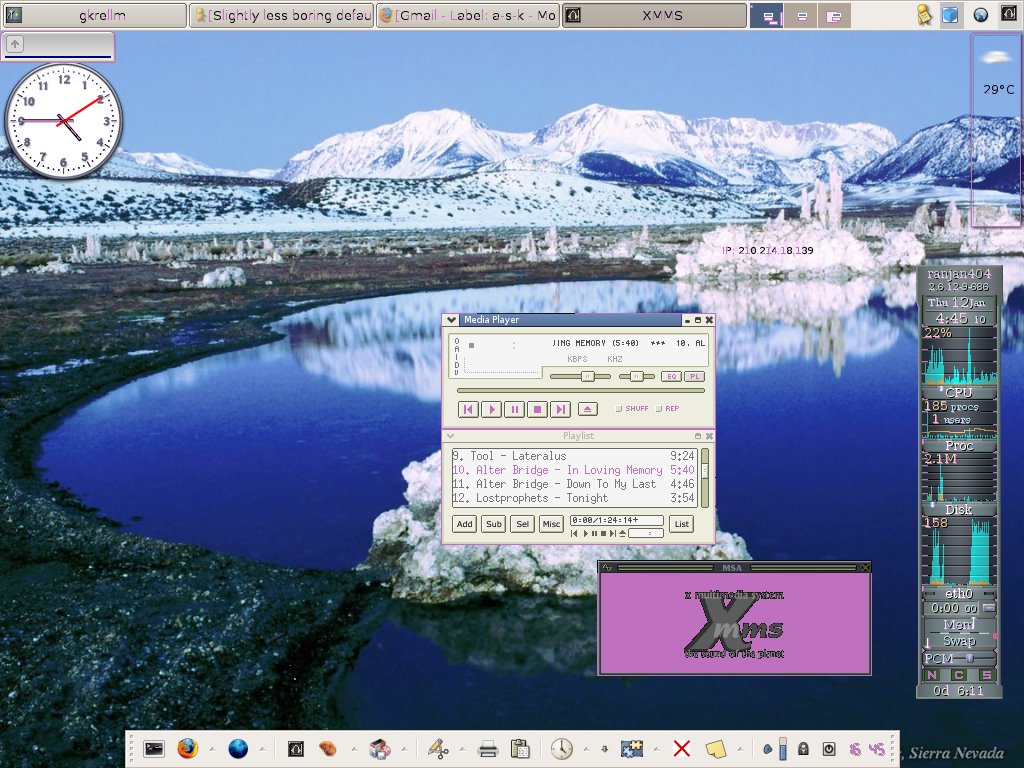
Desktop screenshot


Here is a screenshot of my desktop. Its nothing grand, but its my blog, so I can post whatever I want

Tuesday, January 10, 2006

Frostwire

I found this really great p2p client. I had heard a little about it. Today, I downloaded the linux rpm, used alien to convert it to a deb, and then did a dpkg -i to install it. Its a java progam, but I fell in love with it instantly. Bye bye apollon


Heres a link to frostwire

Monday, December 26, 2005

Howto turn off your monitor when you lock your screen

I wanted to turn off my monitor when I lock my screen. Now, I use xfce, and the (default) shortcut to lock your screen in xfce is ctrl+alt+del

I have a habbit of pressing ctrl+alt+del when I leave the PC for a few minutes, and I thought it would be nice if I could turn off the monitor simultaneously. So here's what I did.

xfce runs the "xflock4" script to lock the screen. So open the script in a text editor
sudo gedit /usr/bin/xflock4

Now add this line before "exit 0"
xset dpms force off

So basically, your file will look like this:


#!/bin/sh
#
# xfce4
#
# Copyright (C) 1999, 2003 Olivier Fourdan (fourdan@xfce.org)
#
# This program is free software; you can redistribute it and/or modify
# it under the terms of the GNU General Public License as published by
# the Free Software Foundation; either version 2 of the License, or
# (at your option) any later version.
#
# This program is distributed in the hope that it will be useful,
# but WITHOUT ANY WARRANTY; without even the implied warranty of
# MERCHANTABILITY or FITNESS FOR A PARTICULAR PURPOSE. See the
# GNU General Public License for more details.
#
# You should have received a copy of the GNU General Public License
# along with this program; if not, write to the Free Software
# Foundation, Inc., 59 Temple Place - Suite 330, Boston, MA 02111-1307, USA.
#

xscreensaver-command -lock || xlock $*
xset dpms force off
exit 0

The disadvantage is that if your mouse moves, or any key is pressed, the monitor won't turn off again, but I can live with that :)

Please feel free to leave comments and suggestions.

Again, do this at your own risk, and don't forget to make a backup.

Linux.com - Double Sided Printing

Linux.com - Double Sided Printing

Note: I haven't tried it out yet, but it looks promising.

GIMPTalk.com - Ultimate gimp tutorials and community forum

GIMPTalk.com - Ultimate gimp tutorials and community forum