A recent Ubuntu update made my system unusable. I couldn't boot in recovery mode, and I couldn't even press 'e' or 'c' in Grub to change options. Annoyed with this, I decided to try out Arch Linux.
I downloaded the 64-bit netinstall version, loaded the beginners' guide from the wiki on my laptop and proceeded to install it on the desktop. It was by no means, a piece of cake, but nothing I couldn't handle.
I already had my disk partitioned as per my needs, so I just needed to erase the Ubuntu Root partition. I have a separate /home partition, but I moved all my dot-hidden files into a separate folder to avoid conflicts.
Here is a list of issues I encountered during installation and configuring:
1) My local timezone was not present in the options provided during installation. So I just chose the closest one (which was about 30 minutes off). After setting up X, I found my timezone in /usr/share/zoneinfo, and made the changes in /etc/rc.conf.
2) When presented with cfdisk during installation, I deleted my ubuntu root partition, and made a new ext3 partition. This, however, didn't erase my partition. The old files from Ubuntu were still there! I didn't realize this at first and thus ended up wasting time. Later on, I just used a GParted LiveCD to delete the partition and reformat to ext3. That took care of it.
(I still don't know what I did wrong with cfdisk. If anyone has any idea, please leave a comment)
3) Post installation: When booting Arch, I would sometimes get a bad superblock error. I realized that this was happening because /devsda and /dev/sdb were getting swapped randomly. So I put in the liveCD and changed the /etc/fstab entries to UUID instead of sda and sdb. (Yeah, I was lazy the first time)
4) eth0 and eth1 are still getting swapped randomly. I use only one ethernet interface at present, so I just configured both with the same settings.
(Edit: found solution here)
Why I chose Arch
I wanted to try out Arch since a long time, but I had a slow internet connection. Recently, I upgraded to a better connection. This was important, since Arch involved a lot of initial downloading.
Arch seems to have a good package repository (though not as large a Ubuntu), which would help me keep the compiling and dependency headaches to a minimum. I've tried out Red Hat, Fedora, Slackware and Ubuntu in the past. I've stuck with Ubuntu for long, and its been my favourite so far. I'd still recommend Ubuntu to newbies.
Arch gives me the power to configure my system any way I like. And I like this kind of power.
First impressions
The wiki pages are comprehensive. The effort taken by the community to keep this updated is mindblowing. Great job guys! I hope I can contribute soon. Also, asking noob-ish questions on the forums seems to invite a lot of hostility :P (Not experienced first hand, I still have to make a forum account)
The concept of the BSD-style /etc/rc.conf is beautiful and simple. Organising and loading daemons is also very simple.
I also find the distro to be faster compared to Ubuntu. But that may be because I've used 'noatime' in my fstab. (Never really tried that option in Ubuntu).
In conclusion
I still have a lot to learn about Arch. It definitely looks promising. I can understand why so many people move to Arch after starting out with Ubuntu. I'm not throwing this as flamebait, its just that Ubuntu and Arch cater to different kinds of users.
Friday, December 04, 2009

Saturday, July 04, 2009
MPlayer remote control using a cellphone and ssh
Background
I recently purchased a Nokia E63 cellphone. With a home wifi connection and an ssh client installed on the phone and after getting over the initial excitement of remote-rickrolling the people in my room, I figured that I could use the phone as a remote for MPlayer. This would allow me to watch movies while sitting comfortably on my bed without the need to get up time and again to adjust the volume or pause the movie. Cool!
Requirements
Procedure
If you plan to use this, please do so at your own risk. Any suggestions and comments are welcome.
I recently purchased a Nokia E63 cellphone. With a home wifi connection and an ssh client installed on the phone and after getting over the initial excitement of remote-rickrolling the people in my room, I figured that I could use the phone as a remote for MPlayer. This would allow me to watch movies while sitting comfortably on my bed without the need to get up time and again to adjust the volume or pause the movie. Cool!
Requirements
- A phone with an ssh client and wifi support
- A computer running an ssh server (I use openssh-server on Ubuntu)
- The MPlayer movie player
- The lack of a better infrared or bluetooth remote control
- Boredom
Procedure
- Installing the PuTTY ssh client the phone
- Creating the mplayyerremote user
- Creating the python script mplayerremote.py
- Creating the FIFO pipe
- Modifying the .bashrc file for the user mplayerremote
- Modifying the ~/.mplayer/config file
- Creating an MPlayer Remote profile for PuTTY
The Nokia E63 uses the Symbian S60 3rd Edition. PuTTY for Symbian can be downloaded from here.
It may be an unprivileged user. The only purpose for a new user is convenience. I set a phone-friendly password for this user. The user can be added in Ubuntu via System > Administration > Users and Groups. This will also take care of creating the home directory for the user.
Once the user is created, login as the user from a terminal.
sudo login mplayerremoteOnce logged in, create a file named mplayerremote.py containing the following code:
#!/usr/bin/env python
import curses.wrapper
pipe_location="/home/mplayerremote/rc"
KEY_ENTER=10 #specific to my phone
def main(stdscr):
  stdscr.addstr("MPlayer Remote\n")
  while True:
      pipe=open(pipe_location,'w')
      c=stdscr.getch()
      if c==ord('f'):
          pipe.write("vo_fullscreen"+"\n")
      elif c==curses.KEY_RIGHT:
          pipe.write("seek 10"+"\n")
      elif c==curses.KEY_LEFT:
          pipe.write("seek -10"+"\n")
      elif c==ord('/'):
          pipe.write("seek 600"+"\n")
      elif c==ord('@'):
          pipe.write("seek -600"+"\n")
      elif c==curses.KEY_UP:
          pipe.write("volume +1"+"\n")
      elif c==curses.KEY_DOWN:
          pipe.write("volume -1"+"\n")
      elif c==ord('j'):
          pipe.write("sub_select"+"\n")
      elif c==ord('o'):
          pipe.write("osd"+"\n")
      elif c==ord('p') or c==ord(' ') or int(c)==KEY_ENTER:
          pipe.write("pause"+"\n")
      elif c==ord('q'):
          pipe.write("quit"+"\n")
          break
      pipe.close()

curses.wrapper(main)
The command nano ./mplayerremote.py can be used to create the file. Run chmod +x ./mplayyerremote.py to make the file executable. I have only basic mplayer commands in this script. Feel free to expand it or change it. The commands I've used are:
f: fullscreen
right-arrow : seek forward 10 seconds
left-arrow : seek backward 10 seconds
up-arrow : volume up
down-arrow : volume down
'/' : seek forward 10 minutes
'@' : seek backward 10 minutes
'p' or [space] or [enter] : pause/resume playback
j: cycle through available subtitles
o: toggle osd mode
q: quit the application and mplayer
I have taken advantage of the Qwerty keyboard of the E63. For numeric keypads, this script would suck unless modified to be more convenient. The script makes use of the Curses library to capture the keystrokes
This named pipe allows us to 'talk' to mplayer. Use the following commands while you are still logged in as mplayerremote:
mkfifo rc
chmod a+rw ./rc
The python script assumes that the pipe is located at /home/mplayerremote/rc . Change the pipelocation variable in the script if you choose to put it in any other location
I wanted the mplayerremote.py script to run automatically whenever I logged in as mplayerremote and exit as soon as I quit the application. To do this, I appended the following two lines in the .bashrc file of mplayyerremote's home directory:
/home/mplayerremote/mplayerremote.py
exit
To make mplayer use the named pipe we created, we need to use the -input file=[path_of_pipe] option with mplayer. To avoid writing this every time, we can edit the ~/.mplayer/config file and append the line: input:file=/home/mplayerremote/rc
Note that this ~/.mplayer/config file is in the home directory of your normal user that usually runs mplayer and not the mplayerremote user. mplayerremote user is just the remote control and nothing more.
PuTTY for S60 allows the creation of profiles. I have created a dedicated profile for mplayerremote with the username saved. Setting the Keepalive interval (to 60 or so) may also help prevent disconnections. Effectively, the only thing I have to do to activate my remote is select the PuTTY profile, choose the home wifi connection and enter my (phone-friendly) password for mplayyerremote.
If you plan to use this, please do so at your own risk. Any suggestions and comments are welcome.
Edit (2010-Feb-28): Found an excellent program named Remuco that does exactly what I was looking for. Supports Bluetooth as well.
Friday, March 27, 2009
keeponline.sh (Yet another one)
I have posted two versions of my keeponline.sh script. (The one that checks if I have been disconnected from the net and reconnects)
Here's the latest one. It is now capable of checking if one instance is already running, and won't start another one unnecessarily:
There is no real use for this script, since SuperSify provides this feature. But I found that my version has less number of false positives when the bandwidth is completely choked. Besides, I just wanted to learn how to use traps :)
Here's the latest one. It is now capable of checking if one instance is already running, and won't start another one unnecessarily:
#!/bin/bash
#echo "Going Online..."
#/usr/local/bin/online.sh > /dev/null
LOCKFILE="/var/lock/keeponline.lock"
trap "{ echo $0 removing lock; rm -f $LOCKFILE; exit 255; }" SIGINT SIGTERM
if [ -f $LOCKFILE ]; then
      echo "$0: already running, exiting..."
      exit 1
fi
touch $LOCKFILE
while true; do
      ping -c 2 -W 120 www.google.com > /dev/null

      if [ "$?" = "0" ]; then
              echo "You are connected"
      else
              /usr/local/bin/online.sh > /dev/null
              echo "Disconnect detected at `date`, reconnecting" >>  /home/akshay/logs/keeponline.log
      fi
      sleep 10m
done
There is no real use for this script, since SuperSify provides this feature. But I found that my version has less number of false positives when the bandwidth is completely choked. Besides, I just wanted to learn how to use traps :)
Thursday, March 26, 2009
How I increased sound volume in ubuntu
Ever since I upgraded my machine, I got very low sound volume in Ubuntu. In windows, the volume was nice and loud enough. After digging around a lot, I tried something on my own and it worked! (Yes, I had tried playing around with all the volume controls in alsamixer)
I have an NVidia nForce 630i board and I'm using the onboard sound card:
For some strange reason, I see four mixer devices:
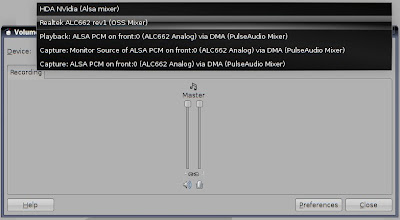
I use pulseaudio as my default sound server. Here's what I did:
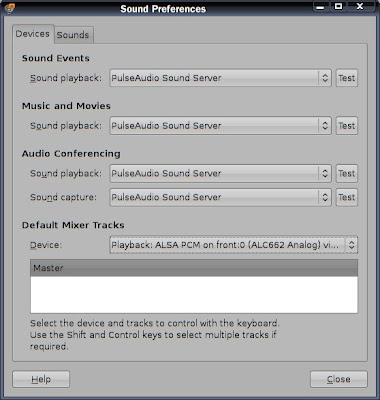
Under System > Preferences > Sound, I changed my Default Mixer Tracks to Playback: ALSA PCM on front :0 (ALC662 Analog) via DMA (PulseAudio Mixer)
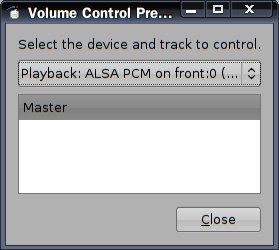
Right clicked on the volume control applet in the panel > Preferences. Here, I could choose the default device and track to control. I chose the same: Playback: ALSA PCM on front :0 (ALC662 Analog) via DMA (PulseAudio Mixer). (There's only a master track).
Finally, I made all the other relevant volumes 100% in all the other devices (except capture devices). Don't forget to click on the "Preferences" button to see all the tracks
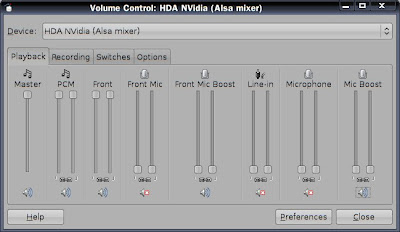
I'm essentially using only the Playback: ALSA PCM on front :0 (ALC662 Analog) via DMA (PulseAudio Mixer) for controlling my volume. I don't know why or how this works, but it works for me...
The only problem is that it won't remember my volume levels after I reboot.
I have an NVidia nForce 630i board and I'm using the onboard sound card:
00:0a.0 PCI bridge: nVidia Corporation MCP73 PCI Express bridge (rev a1)
For some strange reason, I see four mixer devices:

I use pulseaudio as my default sound server. Here's what I did:
Under System > Preferences > Sound, I changed my Default Mixer Tracks to Playback: ALSA PCM on front :0 (ALC662 Analog) via DMA (PulseAudio Mixer)

Right clicked on the volume control applet in the panel > Preferences. Here, I could choose the default device and track to control. I chose the same: Playback: ALSA PCM on front :0 (ALC662 Analog) via DMA (PulseAudio Mixer). (There's only a master track).

Finally, I made all the other relevant volumes 100% in all the other devices (except capture devices). Don't forget to click on the "Preferences" button to see all the tracks

I'm essentially using only the Playback: ALSA PCM on front :0 (ALC662 Analog) via DMA (PulseAudio Mixer) for controlling my volume. I don't know why or how this works, but it works for me...
The only problem is that it won't remember my volume levels after I reboot.
Sunday, February 08, 2009
Transparent menus in Gnome using compiz
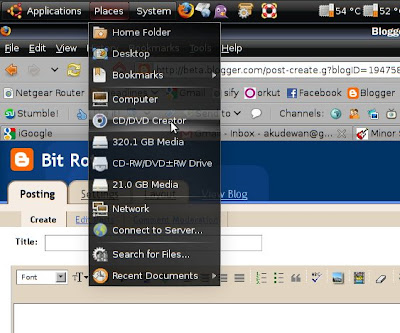
This needs installation of compizconfig-settings-manager (sudo apt-get install compizconfig-settings-manager)
Run (Alt+F2) > ccsm
Under accesibility, there' s an option called Opacity, Brightness and Saturation.

In here, under the Opacity tab, there's a section called "Window specific settings." Click on the New button. Write dropdownmenu in the Windows textbox. Set the opacity to 85 or so...
Click Close, do the same for popupmenu instead of dropdownmenu.


Tuesday, November 11, 2008
Making Kde4/Qt4 apps look like Gnome/Gtk
1) Get QGtkStyle using svn - http://labs.trolltech.com/page/Projects/Styles/GtkStyle
Or
Download a .deb from here
2) Get qt4-qtconfig
3) Run qtconfig-qt4 (Using alt+f2). Select the GUI Style as GTK and File>Save.
4) Incase this does not work, install these packages:
Then run systemsettings. Go the Appearance section, and change the Widget style to GTK.
Or
Download a .deb from here
2) Get qt4-qtconfig
sudo apt-get install qt4-qtconfig
3) Run qtconfig-qt4 (Using alt+f2). Select the GUI Style as GTK and File>Save.
4) Incase this does not work, install these packages:
sudo apt-get install kdebase-workspace systemsettings
Then run systemsettings. Go the Appearance section, and change the Widget style to GTK.
Sunday, September 28, 2008
"renamescore"
(Yes, yet another shell script)
I wrote a little bash script to replace all the underscores in a filename with spaces, in the current directory.
Here it is:
I wrote a little bash script to replace all the underscores in a filename with spaces, in the current directory.
Here it is:
#!/bin/bash
#this script renames all filenames containing _ with [space], in the current directory
#copy to /usr/local/bin and set permission as +x

total=`ls | grep .*_.* | wc -l`
count=0
while [ $count -lt $total ]
do

     filename=`ls | grep .*_.* | head -1`
     newfilename=`ls | grep .*_.* | head -1 | tr '_' ' '`
     mv "$filename" "$newfilename"
     echo "renamed $filename to $newfilename"
     count=`expr $count + 1`
done
Friday, September 12, 2008
Alternate approach to 'keeponline'
Instead of running the 'keeponline' script (described here) as a cron job, I decided to make it run as a standalone script. (Because the cron job kept spamming my syslog file)
The new /usr/local/bin/keeponline.sh looks like this:
Next I make another script, keeponline-launch inside /etc/network/if-up.d/
This will basically launch the keeponline script when the network interface comes up :)
(Thanks to Vivaldi Gloria from ubuntuforums)
The new /usr/local/bin/keeponline.sh looks like this:
#!/bin/bash
echo "Going Online..."
/usr/local/bin/online.sh > /dev/null
while true; do
     ping -c 1 -W 120 www.google.com > /dev/null

     if [ "$?" = "0" ]; then
             echo "You are connected"
     else
             /usr/local/bin/online.sh > /dev/null
             echo "Disconnect detected at `date`, reconnecting" >>  /home/akudewan/logs/keeponline.log
     fi
     sleep 10m
done
Next I make another script, keeponline-launch inside /etc/network/if-up.d/
#!/bin/bash

# Not for loopback!
[ "$IFACE" != "lo" ] || exit 0

sh /usr/local/bin/keeponline.sh &

exit 0
This will basically launch the keeponline script when the network interface comes up :)
(Thanks to Vivaldi Gloria from ubuntuforums)
Monday, July 28, 2008
OpenOffice is irritating!
OpenOffice can really piss you off at times. It can be extremely unintuitive...
For instance, I wanted to print out some slide handouts today. There is a tab called "Handouts" at the top, where you can select a layout.

Now to print this, I went the usual File > Print, and ended up getting a normal print, not he handouts...
So what do you have to do to get Handouts instead of the normal print?
Go to File > Print. And click on the button called "Options"

Now how could this have been more intuitive? Instead of a button called "Options..." we could have a button called "Select print contents..." Or even better, if I'm currently on the handouts tab, select the handouts by default.
Despite the occasional irritations, OpenOffice is awesome. There I still a lot of improvements I'd like to see though.
For instance, I wanted to print out some slide handouts today. There is a tab called "Handouts" at the top, where you can select a layout.

Now to print this, I went the usual File > Print, and ended up getting a normal print, not he handouts...
So what do you have to do to get Handouts instead of the normal print?
Go to File > Print. And click on the button called "Options"

Now how could this have been more intuitive? Instead of a button called "Options..." we could have a button called "Select print contents..." Or even better, if I'm currently on the handouts tab, select the handouts by default.
Despite the occasional irritations, OpenOffice is awesome. There I still a lot of improvements I'd like to see though.
Wednesday, May 21, 2008
A bash script to keep me online
Most people I know don't use the Internet to its full potential. And they still complain about their ISP. People like me, who practically live on food, clothing, shelter and the internet have every right to complain. Despite having an unlimited connection, my ISP decides to kick me off the net ever so often, especially when I leave a large download running at night. Its a daily affair, and I needed a solution.
I already have two shell scripts to conveniently get on and off the net, which I call online.sh and offline.sh . Sify, my ISP, provides a graphical login program. This means that I cannot login if I don't have the X server running. Its a bad idea to have a login program in the first place, and even worse that it needs the X server. Fortunately, there are alternatives out there, and I use SuperSify instead.
So the /usr/local/bin/online.sh script is as simple as:
Make sure you chmod it to deny rw permissions to other users. I would have preferred to encrypt the password, but I don't know how. (replace the mac address with whatever you mac address is. Run ifconfig to find out)
Now comes the script which checks if you're online, and connects you if you're not. It just pings google.
/usr/local/bin/keeponline.sh
Unfortunately, the log file can grow too large. So there's yet another script to reset the log file every month.
/usr/local/bin/resetlog.sh
Needless to say, this is a very dirty fix, so you can skip the log file altogether if you wish.
Now we need to run two shellscripts as cron jobs - keeponline.sh and resetlog.sh.
Run the command:
This will edit/create a crontab file for the user you're logged in as.
Add the following lines to this file:
This means that keeponline.sh will be run every 10 minutes, and resetlog.sh will be run on the 1st of every month.
(Run crontab -l to see your crontab)
Thats it! Now my ISP can't kick me off for more than 11 minutes :)
I already have two shell scripts to conveniently get on and off the net, which I call online.sh and offline.sh . Sify, my ISP, provides a graphical login program. This means that I cannot login if I don't have the X server running. Its a bad idea to have a login program in the first place, and even worse that it needs the X server. Fortunately, there are alternatives out there, and I use SuperSify instead.
So the /usr/local/bin/online.sh script is as simple as:
#!/bin/bash
cd /media/hda1/supersify/
./ss.sh -u your_username -p xxxx -m 00:11:B6:22:BB:F7
Make sure you chmod it to deny rw permissions to other users. I would have preferred to encrypt the password, but I don't know how. (replace the mac address with whatever you mac address is. Run ifconfig to find out)
Now comes the script which checks if you're online, and connects you if you're not. It just pings google.
/usr/local/bin/keeponline.sh
#!/bin/bash
ping -c 1 -W 60 www.google.com

if [ "$?" = "0" ]; then
  echo "You are connected"
else
  /usr/local/bin/online.sh
  echo "Disconnect detected at `date`, reconnecting" >>  /home/akudewan/logs/keeponline.log
fi
Unfortunately, the log file can grow too large. So there's yet another script to reset the log file every month.
/usr/local/bin/resetlog.sh
#!/bin/bash
mv /home/akudewan/logs/keeponline.log /home/akudewan/logs/keeponline.log.0
Needless to say, this is a very dirty fix, so you can skip the log file altogether if you wish.
Now we need to run two shellscripts as cron jobs - keeponline.sh and resetlog.sh.
Run the command:
crontab -e
This will edit/create a crontab file for the user you're logged in as.
Add the following lines to this file:
# m h  dom mon dow   command
0,10,20,30,40,50 * * * * /usr/local/bin/keeponline.sh 1> /dev/null
* * 1 * * /usr/local/bin/resetlog.sh
This means that keeponline.sh will be run every 10 minutes, and resetlog.sh will be run on the 1st of every month.
(Run crontab -l to see your crontab)
Thats it! Now my ISP can't kick me off for more than 11 minutes :)
Saturday, May 17, 2008
Always read your log files
Whenever there is a new Ubuntu release, there's one part of the world that thinks that it is the worst upgrade ever, and the other part of the world that thinks that its the best thing that ever happened. Its the same with every distro, I guess.
After upgrading to Hardy, I thought it was the worst upgrade ever. The system was unstable, buggy, and programs would crash randomly. This was until I read my log files after an X server crash.
Bad Page? I know the next thing to do. Check the RAM! I ran the memtest86+ thingy that comes with Ubuntu. And sure enough, it showed errors in Test 5. The RAM chip works fine in the first slot, so it would seem that the problem is with the second slot. Since the mobo and RAM are still under warranty, I can get this fixed before its too late.
I wouldn't even know that there was something wrong with my RAM slot if I hadn't read my log files. I remember in my old machine, the graphics card fan was bust, and it would start running in "modulated clock mode". The log files told me.
A few days ago, I was getting random telnet attempts from IPs in Korea and China. Again, it was in the log files. Most probably botnets. I decided to remove telnetd and just stick to ssh instead.
Even if you don't know what the log files mean, doing a Google can show a few results with bugs or solutions to the problem.
After upgrading to Hardy, I thought it was the worst upgrade ever. The system was unstable, buggy, and programs would crash randomly. This was until I read my log files after an X server crash.
from /var/log/syslog :
May  8 12:34:08 ranjandesk -- MARK --
May  8 12:46:35 ranjandesk gdm[5796]: WARNING: gdm_slave_xioerror_handler: Fatal X error - Restarting :0
May  8 12:46:51 ranjandesk kernel: [ 6802.873564] Bad page state in process 'kdesktop'
May  8 12:46:51 ranjandesk kernel: [ 6802.873565] page:c1a04120 flags:0x80000000 mapping:00000000 mapcount:-285212672 count:0
May  8 12:46:51 ranjandesk kernel: [ 6802.873566] Trying to fix it up, but a reboot is needed
May  8 12:46:51 ranjandesk kernel: [ 6802.873567] Backtrace:
May  8 12:46:51 ranjandesk kernel: [ 6802.873591]  [bad_page+0x63/0xa0] bad_page+0x63/0xa0
May  8 12:46:51 ranjandesk kernel: [ 6802.873620]  [get_page_from_freelist+0x343/0x3a0] get_page_from_freelist+0x343/0x3a0
May  8 12:46:51 ranjandesk kernel: [ 6802.873662]  [agpgart:__alloc_pages+0x4f/0x340] __alloc_pages+0x4f/0x340
May  8 12:46:51 ranjandesk kernel: [ 6802.873684]  [anon_vma_prepare+0x1d/0xe0] anon_vma_prepare+0x1d/0xe0
May  8 12:46:51 ranjandesk kernel: [ 6802.873687]  [loop:kunmap_atomic+0x6a/0xa0] kunmap_atomic+0x6a/0xa0
May  8 12:46:51 ranjandesk kernel: [ 6802.873699]  [__handle_mm_fault+0x8c7/0xb00] __handle_mm_fault+0x8c7/0xb00
May  8 12:46:51 ranjandesk kernel: [ 6802.873713]  [snd_pcm:getnstimeofday+0x36/0x96b0] getnstimeofday+0x36/0xd0
May  8 12:46:51 ranjandesk kernel: [ 6802.873732]  [sched_clock+0x1a/0x70] sched_clock+0x1a/0x70
May  8 12:46:51 ranjandesk kernel: [ 6802.873755]  [do_page_fault+0x126/0x690] do_page_fault+0x126/0x690
May  8 12:46:51 ranjandesk kernel: [ 6802.873792]  [do_page_fault+0x0/0x690] do_page_fault+0x0/0x690
May  8 12:46:51 ranjandesk kernel: [ 6802.873798]  [error_code+0x72/0x80] error_code+0x72/0x80
May  8 12:46:51 ranjandesk kernel: [ 6802.873818]  [clip_ioctl+0x3a0/0x510] clip_ioctl+0x3a0/0x510
May  8 12:46:51 ranjandesk kernel: [ 6802.873836]  =======================
Bad Page? I know the next thing to do. Check the RAM! I ran the memtest86+ thingy that comes with Ubuntu. And sure enough, it showed errors in Test 5. The RAM chip works fine in the first slot, so it would seem that the problem is with the second slot. Since the mobo and RAM are still under warranty, I can get this fixed before its too late.
I wouldn't even know that there was something wrong with my RAM slot if I hadn't read my log files. I remember in my old machine, the graphics card fan was bust, and it would start running in "modulated clock mode". The log files told me.
A few days ago, I was getting random telnet attempts from IPs in Korea and China. Again, it was in the log files. Most probably botnets. I decided to remove telnetd and just stick to ssh instead.
Even if you don't know what the log files mean, doing a Google can show a few results with bugs or solutions to the problem.
Friday, May 02, 2008
rsync

rsync is probably the simplest way to sync data between two computers, or even the same computer. Now that I have plenty of storage on my desktop, I can take backups from the laptop. So I tried out rsync.
There are a lot of howtos out there, telling you to schedule backups and stuff. But they seemed somewhat complicated, and I didn't really want scheduling...The laptop runs at irregular times.
So whats the simplest, no-shit solution for rsync? Its grsync!
Ok, then I saw what commands its running on the terminal, and made a shellscript :)
On Ubuntu, install grsync by running: sudo apt-get install grsync
Tuesday, April 15, 2008
Legal advertising == Spam ?
There was recently a story on Slashdot, about a court case - e360 Vs. Comcast - in which the judge declared e360 a spammer. e360 calls itself an Internet marketing company.
I noticed that whenever I get an e-mail that's an advertisement, I mark it as spam! What exactly is spam anyway? Wikipedia defines it thus (E-Mail spam):
A more general definition of spam would be:
I guess there would be legal definitions of Spam, and also definitions by ISPs. But as far as the user is concerned, I could safely say that any kind of advertising e-mail that I never wanted in the first place - is Spam. Invitations from random Social networking sites and communities? Also Spam!(?)
I noticed that whenever I get an e-mail that's an advertisement, I mark it as spam! What exactly is spam anyway? Wikipedia defines it thus (E-Mail spam):
Definitions of spam usually include the aspects that email is unsolicited and sent in bulk.
A more general definition of spam would be:
Spamming is the abuse of electronic messaging systems to indiscriminately send unsolicited bulk messages.
I guess there would be legal definitions of Spam, and also definitions by ISPs. But as far as the user is concerned, I could safely say that any kind of advertising e-mail that I never wanted in the first place - is Spam. Invitations from random Social networking sites and communities? Also Spam!(?)
Monday, March 31, 2008
New Computer
My graphics card finally died, and I decided to get an upgrade. I now have an nForce 610i motherboard, 2GB RAM (800MHz), a Core2Duo (2.33GHz). The motherboard has an on-board GeForce 7050, which is quite good for my needs. I'm using the same hard-disk and DVD drive, but might get a new hard-disk soon.
Now I can finally run visual effects in Ubuntu, and boy, is it sweet!! The pretty animations, the desktop cube - I love it. And it runs so smooth!! Aero just sucks in comparison.
Since the motherboard is quite new, I needed to do some tweaking to get it working properly.
Install the nvidia graphics drivers manually to get the sound working.
For the sound, I followed these instructions posted on ubuntuforums.
The Ethernet card uses the "forcedeth" driver, which has a strange bug that caused the MAC address to change on every boot. I couldn't live with that, since I configure my wireless router based on the MAC. I decided to use my old Ethernet card for the time being.
Now I can finally run visual effects in Ubuntu, and boy, is it sweet!! The pretty animations, the desktop cube - I love it. And it runs so smooth!! Aero just sucks in comparison.
Since the motherboard is quite new, I needed to do some tweaking to get it working properly.
sudo update-pciidsTo get the "lspci" list updated.
Install the nvidia graphics drivers manually to get the sound working.
For the sound, I followed these instructions posted on ubuntuforums.
The Ethernet card uses the "forcedeth" driver, which has a strange bug that caused the MAC address to change on every boot. I couldn't live with that, since I configure my wireless router based on the MAC. I decided to use my old Ethernet card for the time being.
Wednesday, March 19, 2008
Trouble with fans
I noticed a strange phenomenon with my computer. When I try to play a video, CPU usage would shoot up too 100%. I tried the usual troubleshooting methods, playing without the audio stream, trying different video output drivers, and so on...But nothing worked.
Then I noticed something else. If I pause a video for a minute, and then resume it, CPU usage goes back to the usual 20-30%. After a minute of playing, it would shoot up to 100% once again, until I let it cool off...
Sure enough, my CPU fan was bust. I bought a new one today and fixed it. Pentium-4 fans have a reputation of being notoriously difficult to remove. Ended up breaking a clip in the process.
The strange video problem didn't go away though. Next check: Graphics card. And Hurray!! that fan is bust too. Fortunately, a little nudging got it to work. But it seems I'll have to nudge it every time I start my computer.
I think its time to buy a new mobo. Nobody sells AGP 4x cards anymore :(
Edit: here's a good one. Anything running OpenGL (glxgears, -vo gl2 in mplayer) segfaults whenever the fan is RUNNING!! Works fine when its off...wtf.....
Edit Edit: If I stop the fan with my finger, and then start glxgears, it runs fine (even after I let go and the fan starts). Then I can run it even while the fan is running...
Hmm...this is quite entertaining...
If anyone has an explanation for this strange behavior, do leave a comment.
Looking forward to the sweet smell of burning silicon.
-Aku
Then I noticed something else. If I pause a video for a minute, and then resume it, CPU usage goes back to the usual 20-30%. After a minute of playing, it would shoot up to 100% once again, until I let it cool off...
Sure enough, my CPU fan was bust. I bought a new one today and fixed it. Pentium-4 fans have a reputation of being notoriously difficult to remove. Ended up breaking a clip in the process.
The strange video problem didn't go away though. Next check: Graphics card. And Hurray!! that fan is bust too. Fortunately, a little nudging got it to work. But it seems I'll have to nudge it every time I start my computer.
I think its time to buy a new mobo. Nobody sells AGP 4x cards anymore :(
Edit: here's a good one. Anything running OpenGL (glxgears, -vo gl2 in mplayer) segfaults whenever the fan is RUNNING!! Works fine when its off...wtf.....
Edit Edit: If I stop the fan with my finger, and then start glxgears, it runs fine (even after I let go and the fan starts). Then I can run it even while the fan is running...
Hmm...this is quite entertaining...
If anyone has an explanation for this strange behavior, do leave a comment.
Looking forward to the sweet smell of burning silicon.
-Aku
Saturday, March 01, 2008
Workaround for watching .flv videos on slow computers
I have a 1.6GHz processor, a GeForce 440 MX, and 376MB of RAM. But it seems I have to upgrade to a GeForce 8-series or something to play friggin' flv video in Linux. Until I can do that, I think I'll have to use this workaround:
This works with youtube, but I think it should work with any website that allows videos to be buffered.
- Let the video buffer completely.
- Close the window so that it stops sucking 100% CPU
- Go to the .mozilla/firefox/
/Cache directory - $ ls -lhS
- The entries on the top are the largest, one of them will be the video. Try running them with mplayer.
- Copy and rename if the video is worth saving on disk.
This works with youtube, but I think it should work with any website that allows videos to be buffered.
Thursday, February 28, 2008
Sorry, not supported in Linux
I hate it when I buy a piece of hardware and find that it's not supported in Linux. Why don't I have the freedom to choose the operating system of my choice?
Some companies have problems with opening up their drivers. Fine. At least do what nVidia does, provide closed, binary drivers. (Thank you nVidia, at least you provide them, and they work!).
Flash on Linux has always been a problem. It runs slow, jittery and is practically unusable. I tried to find out if other users were facing this problem, and sure enough, many are. The solution posted on (this thread) was to downgrade to a previous release of Flash. I had to download a 73MB archive containing a number of previous releases from Adobe's website. Adobe doesn't seem to care much about Linux users. Even the downgraded version has issues, but at least its somewhat usable.
I'm in a good mind to write to every company I come across that doesn't provide Linux support. About time Linux users made themselves heard. There are already a number of petitions.
Some companies have problems with opening up their drivers. Fine. At least do what nVidia does, provide closed, binary drivers. (Thank you nVidia, at least you provide them, and they work!).
Flash on Linux has always been a problem. It runs slow, jittery and is practically unusable. I tried to find out if other users were facing this problem, and sure enough, many are. The solution posted on (this thread) was to downgrade to a previous release of Flash. I had to download a 73MB archive containing a number of previous releases from Adobe's website. Adobe doesn't seem to care much about Linux users. Even the downgraded version has issues, but at least its somewhat usable.
I'm in a good mind to write to every company I come across that doesn't provide Linux support. About time Linux users made themselves heard. There are already a number of petitions.

Saturday, February 16, 2008
Adblock or not ?
Firefox has this neat extension called Adblock. It blocks out those annoying ads on web pages. Great! Now I don't have to look at flashing smiley ads anymore. (Who the heck would want to buy smileys anyway?)
But when I installed Google AdSesnse on my blogs, sure enough, I couldn't see them. Now, ads definitely help bring the pennies in, but do they have to be so annoying that people should want to block them? Most users hate ads, as they are distracting and loud[citation needed (LOL)]. In my case, Flash ads even use up a lot of CPU. (Hopefully, Flash will be faster with Firefox 3). In comparison, Google Ads are not irritating, and are usually quite relevant.
Some people go so far as to call Adblock "Stealing", and there are a number of discussions on this topic.
So my dilemma was: whether to Adblock or not. I thought of striking a balance. I have Adblock installed, but I'm not subscribed to any of the filters. I block the irritating, flashy ads manually.
But when I installed Google AdSesnse on my blogs, sure enough, I couldn't see them. Now, ads definitely help bring the pennies in, but do they have to be so annoying that people should want to block them? Most users hate ads, as they are distracting and loud[citation needed (LOL)]. In my case, Flash ads even use up a lot of CPU. (Hopefully, Flash will be faster with Firefox 3). In comparison, Google Ads are not irritating, and are usually quite relevant.
Some people go so far as to call Adblock "Stealing", and there are a number of discussions on this topic.
So my dilemma was: whether to Adblock or not. I thought of striking a balance. I have Adblock installed, but I'm not subscribed to any of the filters. I block the irritating, flashy ads manually.
Saturday, February 09, 2008
The Linux blog expanded
http://akulinux.blogspot.com/ is now http://bit-rot.blogspot.com/ . Why the change? The Linux blog was just a journal of problems and solutions that I came across while using linux. This blog however, deals with anything and everything that's tech-related.
Please feel free to leave comments, suggestions, your arguments, or if you simply wish to call me a nut for my naïve posts :)
Please feel free to leave comments, suggestions, your arguments, or if you simply wish to call me a nut for my naïve posts :)
Sunday, December 30, 2007
Shellscript to save power
Even though I run a Desktop, I do whatever I can to save electricity. Turning off the monitor helps a great deal. Then there's CPU frequency scaling. But when I set my machine to "ondemand", I noticed a marginal drop in performance, especially when playing a game or something. So I kept my machine on "performance", and set it to "ondemand" only when I had to leave the PC unattended for a while. Needless to say, it was quite a pain in the butt. So I made a shellscript to automate the process. Whenever my screen is locked, the script will turn CPU frequency governor to "ondemand"
Then I added a task to my root crontab:
where /usr/bin/freqmod.sh is the path to the script.
This is my first "real" bash script, so suggestions are welcome :)
#!/bin/bash
#Script to put the cpu in "ondemand" if the screen is locked

check=`pidof kdesktop_lock`
if [[ -n $check ]] ; then
/usr/bin/cpufreq-set -g ondemand
else
/usr/bin/cpufreq-set -g performance
fi

exit 0
Then I added a task to my root crontab:
0,10,20,30,40,50 * * * * root /usr/bin/freqmod.sh
where /usr/bin/freqmod.sh is the path to the script.
This is my first "real" bash script, so suggestions are welcome :)
Subscribe to:
Posts (Atom)