Saturday, February 25, 2006

wma to mp3

I found an old script on linuxquestions.org to convert wma's to mp3's.
I had to make a minor change to get it working with the latest version
of mplayer.


Requirements: Lame, mplayer.


To save the script, do this:

sudo
gedit /usr/bin/wma2mp3


then copy paste the code.

Then type:

sudo
chmod a+x /usr/bin/wma2mp3


If you don't have sudo, then just remove sudo and run the commands as
root.


Here is the code:


#!/bin/bash

current_directory=$( pwd )
#remove spaces
for i in *.wma; do mv "$i" `echo $i | tr ' ' '_'`; done
#remove uppercase
for i in *.[Ww][Mm][Aa]; do mv "$i" `echo $i | tr '[A-Z]' '[a-z]'`; done
#Rip with Mplayer / encode with LAME
for i in *.wma ; do mplayer -vo null -vc dummy -af resample=44100 -ao
pcm:waveheader $i && lame -m s audiodump.wav -o $i; done
#convert file names
for i in *.wma; do mv "$i" "`basename "$i" .wma`.mp3"; done
rm audiodump.wav


The script runs without any arguments, and it will convert all files in the folder.

Warning: All files will be overwritten

Wednesday, February 15, 2006

mp3 player

I bought a Creative mp3 player. Its 1 GB, with FM, Voice recorder, FM recorder, 4 equalizer presets, and folder support.

To get it running on linux was a breeze. First, I shoved the player into the usb port, then I mounted the player on a directory that i created, /mnt/usb/

So I do:
sudo mount /dev/sda1 /mnt/usb/

And then I run nautilus as root, and just copy whatever songs I want into the player. Voila !!

I could have solved the permission issues if I wanted to, but I didn't want to :-P

Oh, before pulling out the player, remember to
sudo umount /mnt/usb

Have a nice day!

Monday, February 13, 2006

nihongo benkyo

This is a really cool Japanese dictionary, that I found helpful.
GnomeFiles - GNOME/GTK+ Software Repository

Sunday, February 05, 2006

Evince - PDF viewer

I came across this really neat PDF viewer. I like it bacause I can actually copy-paste text from it :)

Click here to go to the homepage

Thursday, January 12, 2006

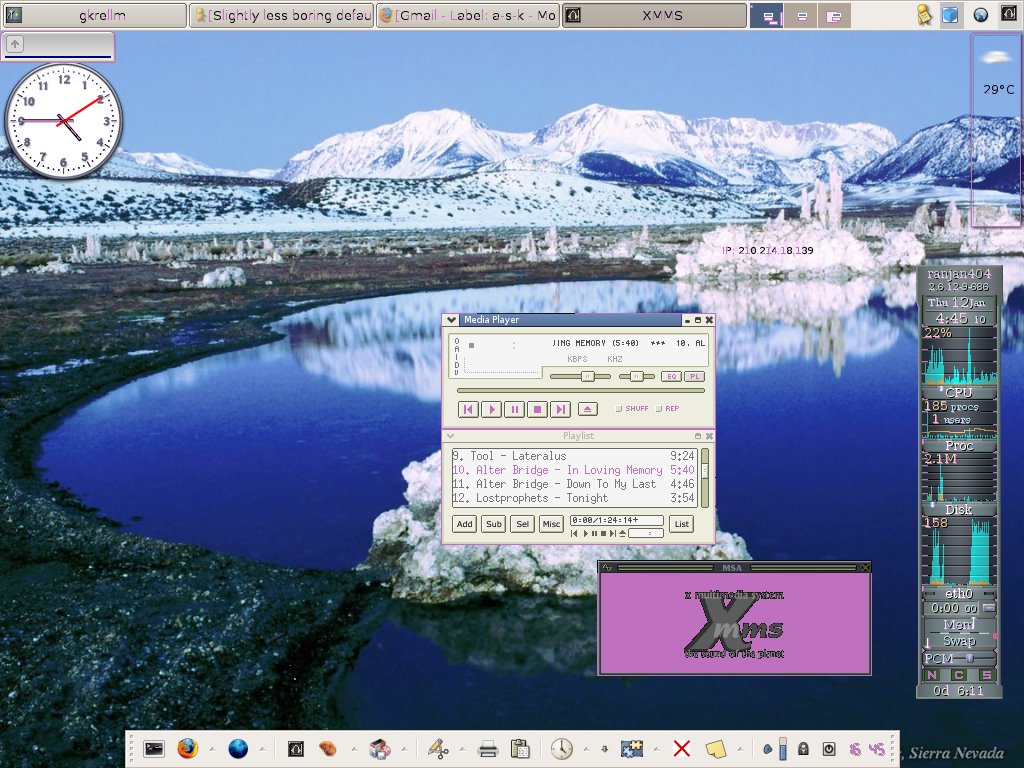
Desktop screenshot


Here is a screenshot of my desktop. Its nothing grand, but its my blog, so I can post whatever I want

Tuesday, January 10, 2006

Frostwire

I found this really great p2p client. I had heard a little about it. Today, I downloaded the linux rpm, used alien to convert it to a deb, and then did a dpkg -i to install it. Its a java progam, but I fell in love with it instantly. Bye bye apollon


Heres a link to frostwire

Monday, December 26, 2005

Howto turn off your monitor when you lock your screen

I wanted to turn off my monitor when I lock my screen. Now, I use xfce, and the (default) shortcut to lock your screen in xfce is ctrl+alt+del

I have a habbit of pressing ctrl+alt+del when I leave the PC for a few minutes, and I thought it would be nice if I could turn off the monitor simultaneously. So here's what I did.

xfce runs the "xflock4" script to lock the screen. So open the script in a text editor
sudo gedit /usr/bin/xflock4

Now add this line before "exit 0"
xset dpms force off

So basically, your file will look like this:


#!/bin/sh
#
# xfce4
#
# Copyright (C) 1999, 2003 Olivier Fourdan (fourdan@xfce.org)
#
# This program is free software; you can redistribute it and/or modify
# it under the terms of the GNU General Public License as published by
# the Free Software Foundation; either version 2 of the License, or
# (at your option) any later version.
#
# This program is distributed in the hope that it will be useful,
# but WITHOUT ANY WARRANTY; without even the implied warranty of
# MERCHANTABILITY or FITNESS FOR A PARTICULAR PURPOSE. See the
# GNU General Public License for more details.
#
# You should have received a copy of the GNU General Public License
# along with this program; if not, write to the Free Software
# Foundation, Inc., 59 Temple Place - Suite 330, Boston, MA 02111-1307, USA.
#

xscreensaver-command -lock || xlock $*
xset dpms force off
exit 0


The disadvantage is that if your mouse moves, or any key is pressed, the monitor won't turn off again, but I can live with that :)

Please feel free to leave comments and suggestions.

Again, do this at your own risk, and don't forget to make a backup.

Linux.com - Double Sided Printing

Linux.com - Double Sided Printing

Note: I haven't tried it out yet, but it looks promising.

GIMPTalk.com - Ultimate gimp tutorials and community forum

GIMPTalk.com - Ultimate gimp tutorials and community forum

Wednesday, December 21, 2005

GNU/Linux Cool Tools

GNU/Linux Cool Tools

Linux.com - Turn Monitor off, use Keyboard LEDs

I found some really cool apps, check out this link:
Linux.com - Turn Monitor off, use Keyboard LEDs

I especially like the one called "tleds." It blinks the LEDs of the keyboard indicating TX and RX network packets :)

Tuesday, December 20, 2005

HOWTO Automatically turn off your monitor

HOWTO Automatically turn off your monitor - Gentoo Linux Wiki

I've used it in ubuntu, haven't tested it out yet, but I guess it will work.

Sunday, December 11, 2005

Firefox middle-click to close tab solution

I upgraded to firefox 1.5 using the ubuntu wiki. (see previous post). Its really cool, the only problem I came across was that when I was middle-clicking to close a tab, it was opening a google "I'm feeling lucky" page.

So I came up with a solution on my own. (yay) :) Here's what I did...


  1. Type about:config in the address-bar
  2. Enter middle in the "filter" area. You will see a few options
  3. Right-click on middlemouse.contentLoadURL and click on Toggle. This will now become bold, and it will show "user set"


And thats it! Now I can middle click on a tab to close it. :)

Warning: Do this at your own risk