Wednesday, May 30, 2007

Issues with the new kernel: 2.6.20-16-generic

Adept-notifier showed me new kernel updates, and I installed these, only to find that I was greeted by a whole bunch of problems.

During the upgrade process, Adept seemed to have hung at 100%, (yes 100%). It showed dpkg-run finished in the terminal. I had to close the window, but just to be on the safe side, I opened a terminal, and ran sudo apt-get upgrade again. There was an unmet dependency, and I sorted this out. All seemed to be OK, and I rebooted the machine.

I had played with my partitions a bit, and all the /dev/sda* entries in the partitions wouldn't be mounted. Also, a new partition that I had created showed some superblock error. I just rebooted the machine, using the old kernel, and none of these problems showed up.

As usual I checked on UbuntuForums, and it seems the new kernel has a whole load of issues:
http://ubuntuforums.org/showthread.php?p=2733874
http://ubuntuforums.org/showthread.php?t=456662

Lets wait and see if the issues are sorted out. It seems all /dev/sda* has been made into /dev/hda* again
neutral

Saturday, May 05, 2007

Edgy to Feisty

I upgraded to Feisty Fawn a few days ago. It was quite a smooth process as compared to the previous release. The upgrade tool on the DVD was crashing, so I used the commandline instead.

Apart from Samba breaking, (which I managed to fix in a few hours), everything went quite well. My thanks to the Ubuntu team for a nice release.
biggrin

Downloading the DVD was quite a waste. Inspite of spending a week downloading 4.3 GB, I still had to download another 400MB. Next time, I'm sticking to solely to apt-get.

Tuesday, April 24, 2007

Monday, April 23, 2007

Saturday, April 21, 2007

Feisty Fawn

Ubuntu Feisty Fawn was released on the 19th. I've been trying to read the wiki pages for upgrading, but the servers are so slow I can barely open a page. I'll have to wait a bit for my upgrade. But till then, I'll download the alternate CD (using bittorrent)
smile

Sunday, April 15, 2007

PhotoRec


I had made a post some months ago, on how to recover accidentally deleted data. I never had to use it, but today, I accidentally deleted an important spreadsheet file, while cleaning up some older files.

PhotoRec came to the rescue. Its fairly simple to use, and within a matter of 20 minutes it searched for over 170 old, deleted files. I easily found the one I was looking for. I think everyone should have a copy of PhotoRec, just in case...

Tip: Don't recover all the files, (I ran out of disk space). Go to "FileOpt" and just select the filetypes you are looking for.

Friday, April 13, 2007

Dvdisaster

Dvdisaster home

Have you ever faced a situation when your important backup DVD is corrupt? I have, and it can be quite frustrating. Strictly speaking, optical media is not good is backups and archiving. But if I were to buy a 100GB hard-disk every 3 months, my dad would freak out
razz

So it would seem that DVDs are the way to go for the time being. And I found a good piece of software that would help me restore my DVDs if they ever got corrupt. Its called Dvdisaster.

The process of creating the error codes is a bit tedious, but it would help with important data.

Saturday, March 10, 2007

Additional Plugins required ?

How many times have you seen the "Additional plugins are required" message in firefox? I found a neat workaround. There's an extension called "Unplug" that allows you to download media directly from a page. Then you can watch it in your favorite media player. (Might not work with Flash though. I'm not sure...)

Monday, February 05, 2007

Saturday, February 03, 2007

Modifying keys with xmodmap

I have fat fingers, and my backspace ans insert keys are quite close to each other. And accidently pressing the insert key instead of backspace can be really annoying....All of a sudden you notice
your text is getting overwritten.

So, is there any way of getting rid of my insert key? Or better yet, can I replace Insert with Backspace? The answer: xmodmap

Here's what I did:

  1. xmodmap -pke > ~/.xmodmap.myown (This created my own xmodmap file)
  2. Open it in a text editor. Find where Insert is. (Keycode 106 in my case)
  3. Find the line with Backspace, and replace the insert value with backspace. In the end, it will look something like this: keycode 106 = BackSpace Terminate_Server


And incase you can't find which keycode is what, then you can run xev in a terminal. Press a key, and its info will be displayed on the terminal.

To use this new configuration, I ran the command: xmodmap ~/.xmodmap.myown

And so that I don't have to run it everytime, I put this command in my KDE autostart directory in a shellscript.

Pretty neat eh?

Monday, January 15, 2007

The DMA toggle

I had to burn a lot of anime for a friend who was visiting after a long time. The first few DVDs burned fine. Then my data transfer rate dropped from 8 to 10 MBps to a mere 2 MBps. I don't know why this happened.

My system started acting odd, there was a lot of CPU usage, and I could barely move my mouse. First thing I did was checked whether DMA was enabled. Yes, it was. Next, I did a google search, and found a forum post somewhere.

The post was about windows users encountering a similar problem, and all they did to solve it was to disable DMA, and then enable it again.

I remembered that there was a problem reading one of my old DVDs. So maybe there were a few CRC (cyclic redundancy check) errors, that caused my system to stop using DMA, just like windows.

Ergo, I decided to "toggle" DMA, turned it off, and turned it back on again. And tada!! All is back to normal. I'm burning as I type!

------------
Edit: 21 March 2007:

Today, the same thing happened, and I now have definite evidence of the fact that DMA was disabled by the kernel:

Mar 21 15:54:36 ranjan404 kernel: [17197775.652000] hdd: DMA disabled

Sure enough, CD burning was slow and crappy, and the mouse went nuts:
Mar 21 16:13:34 ranjan404 kernel: [17198913.988000] psmouse.c: Wheel Mouse at isa0060/serio1/input0 lost synchronization, throwing 3 bytes away.

Saturday, December 16, 2006

The distro of the beast

I came across an interesting version of Ubuntu: Satanic Edition. Check it out...

Wednesday, November 08, 2006

It was a nightmare allright...

But I did manage to get it running. I had run this command to get all the debs in my cache before upgrading the system, as my internet connection is quite slow. (But its free at night)
  apt-get --download-only dist-upgrade 


I checked on the Ubuntu wiki page, and it mentioned that using apt-get is not recommended. So I used the graphical interface, as mentioned. Unfortunately, I got some error, that I didn't bother noting, and the installer quit. The graphical interface gave the same error again, and the only way to fix it would be apt-get -f install

So I chucked the graphical interface, and went back to the CLI. After a whole day of forcing (apt-get -f install) and dpkg-ing (some things went so bad, they had to be done manually), I finally managed to get the system up.

Today, I see that Upstart hasn't been installed, inspite of doing apt-get dist-upgrade twice. I had forgotten to install Ubuntu-minimal...geez...

So now I'm going to reboot my system, and hope that it boots properly, and faster!! :) Wish me luck...

Monday, October 30, 2006

Upgrading to Ubuntu Edgy Eft a "Nightmare" ?

There's an article on Slashdot saying that several people are having trouble upgrading to Edgy (the latest Ubuntu release). I'm currently in the process of upgrading. Lets hope everything works out well...

I have followed this guide to do the upgrade. (The wiki keeps updating) Only difference is that I'm using the command: sudo apt-get --download-only dist-upgrade . Since I have a slow internet connection, I figured it would be better to download all the packages at night, little by little, and then run the upgrade process.

I don't have important data on my root partition, and my /home partition is separate.

Just to be on the safer side, I'll backup all important data before doing the upgrade.

Monday, October 09, 2006

Out of space...

The other day, I was just browsing around, and I started downloading something. All of a sudden, firefox crashed!! I'm like...wtf...

Anyway, I just started the browser again, and recovered my browsing session, thanks to this nice extension.

Then, I tried to copy a shortcut from the K Menu to the desktop. I got an error message saying "Insufficient disk space". Wtf, a teeny-weeny shorcut...how much free space do I have anyway?

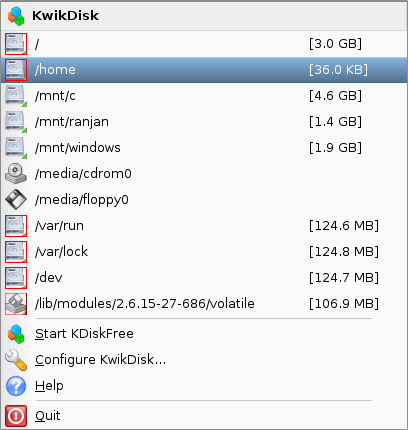
So I started Kwikdisk, and I saw that I just have 36KB free on the /home partition!!!


At this point, I would have expected any operating system to crash. But this is linux, things work differently here. ;)

The reason why firefox crashed was because it probably couldn't cache anything in ~/.mozilla. Technically, this would be a firefox bug, and not a linux bug. (Or so I think).

Finally, I just copied stuff onto my other partitions that had some free space. Now i have a lot of DVDs to burn.

Friday, October 06, 2006

MP3FS and Upstart

No need to rip your CDs to MP3s. You can just use MP3FS: http://www.linux.com/article.pl?sid=06/09/29/1525201

Also, Ubuntu will be replacing init with Upstart. Check out this article for in-depth information: http://www.linux.com/article.pl?sid=06/09/18/1623244

Tuesday, September 05, 2006

Myths, Lies, and Truths about the Linux kernel

The article linked below is a must read for every linux user, new or experienced:
linux kernel monkey log